iScape2.5.4
Publisher Description
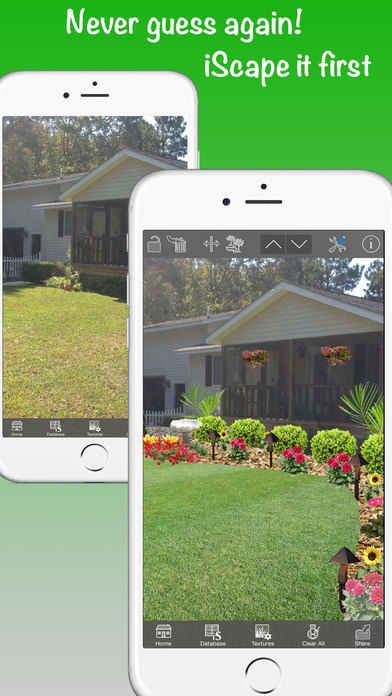
Spectacular landscape designs made easy with iScape!
It s a great app for quick and straightforward designs right on the spot, and we use actual images to give you the most realistic rendering possible.
Homeowners, universities, landscaping companies, and most of the top publications worldwide have lauded iScape as a great landscape and garden design tool. Last year, iScape was featured at New England Grows, the largest horticultural trade show and educational conference in the Northeast. Here are a couple quotes you can view below:
"When you re planning a new garden, or considering a change to an established one, it can be difficult to visualize the results. This is where iScape comes in handy." - The NY Times
"If you re DIYing it, iScape makes it easy to plan out what to buy and how to put it all together. If you re hiring a landscaper, the app can help you explore ideas and share your vision." - Forbes
How can iScape help you? Our user friendly technology provides easy-to-use virtual design tools so you can portray your vision at ease. Having a landscape design app to portray your vision right on the spot will help eliminate the guesswork and confusion which in return will save you valuable time and money. Simply snap a picture and start dragging and dropping scapes into your yard.
One of the biggest challenges for a contractor is how to portray to the client what the completed project will look like before any work is performed. It s equally challenging for the customer to portray their vision to the contractor. iScape's intuitive technology solves this problem.
Are you a do-it-yourself landscaper? iScape can help you decide what to buy and where to plant it. Planning to hire a landscape contractor? You will have actual images to help explain your vision.
ISCAPE'S LANDSCAPE DESIGN APP FEATURES:
Use the "Camera" to take a new picture, or access the device's photo library to choose your background image
"Texture Tool" to add or replace ground covers such as grass, mulch, pavers, stones, etc
Add images to your design by using the "iScape Database" which includes flowers, trees, walkways, pavers, patios, water features, etc
You can add images to your "Favorites" for faster access. Simply open the image and tap the star at the bottom of the screen
Double-tap any image to access the image preferences, located in the top toolbar: includes Delete Layer, Lock or Unlock Layer, Duplicate Layer, Flip Layer, and Arrange the Layers order
Save and Share your design via Camera Roll, Facebook, Email, and Print.
Now when you email a design, it automatically generates a list containing all products in your design
iS DATABASE-"ALL INCLUDED"
1. TREES
Deciduous Trees
Evergreen Trees
Flowering Trees
Palm Trees
2. SHRUBS
Flowering Shrubs
Evergreen Shrubs
3. FLOWERS
Annual Flowers
Perennials Sun
Perennial Shade
4. GRASS/GROUNDCOVER
Perennial Ground Cover
Perennial Grass
5. TROPICAL/CACTUS
Cactus
Tropical/Indoors
6. PLANTERS
Planted
Unplanted
7. WATER FEATURES
Water Falls & Gardens
Swimming Pools
Water Fountains
8. HARDSCAPES
Architecture
Stone and Retention Walls
Walkways and Steps
Paver and Patios
Landscape Decks
Wood Fences
Wrought Iron Fences
Lighting
Yard Art
Novelty Birdhouses
Windows and Doors
We really hope that you enjoy iScape. We are continuously striving to make our apps better and better. Please do not hesitate to contact us with any feedback and/or questions @ www.iscapeapps.com. The user feedback has been a great help with iScape's development and we greatly appreciate it!
Requires iOS 8.0 or later. Compatible with iPhone, iPad, and iPod touch.
About iScape
The company that develops iScape is HOME REVIVALS LLC. The latest version released by its developer is 2.5.4. This app was rated by 9 users of our site and has an average rating of 4.2.
To install iScape on your iOS device, just click the green Continue To App button above to start the installation process. The app is listed on our website since 2010-07-30 and was downloaded 717 times. We have already checked if the download link is safe, however for your own protection we recommend that you scan the downloaded app with your antivirus. Your antivirus may detect the iScape as malware if the download link is broken.
How to install iScape on your iOS device:
- Click on the Continue To App button on our website. This will redirect you to the App Store.
- Once the iScape is shown in the iTunes listing of your iOS device, you can start its download and installation. Tap on the GET button to the right of the app to start downloading it.
- If you are not logged-in the iOS appstore app, you'll be prompted for your your Apple ID and/or password.
- After iScape is downloaded, you'll see an INSTALL button to the right. Tap on it to start the actual installation of the iOS app.
- Once installation is finished you can tap on the OPEN button to start it. Its icon will also be added to your device home screen.
